> ## Documentation Index
> Fetch the complete documentation index at: https://docs.getdecipher.com/llms.txt
> Use this file to discover all available pages before exploring further.
# Sourcemaps
> For TypeScript/JavaScript projects, configure Sourcemaps to get readable code in stack traces.
Configuring sourcemaps is optional, but **strongly recommended** to enhance debuggability.
If your project is using TypeScript/JavaScript, production code will likely be minified/bundled when deployed. To ensure that your error stack traces have readable code, you'll need to make sure sourcemaps get sent to Decipher.
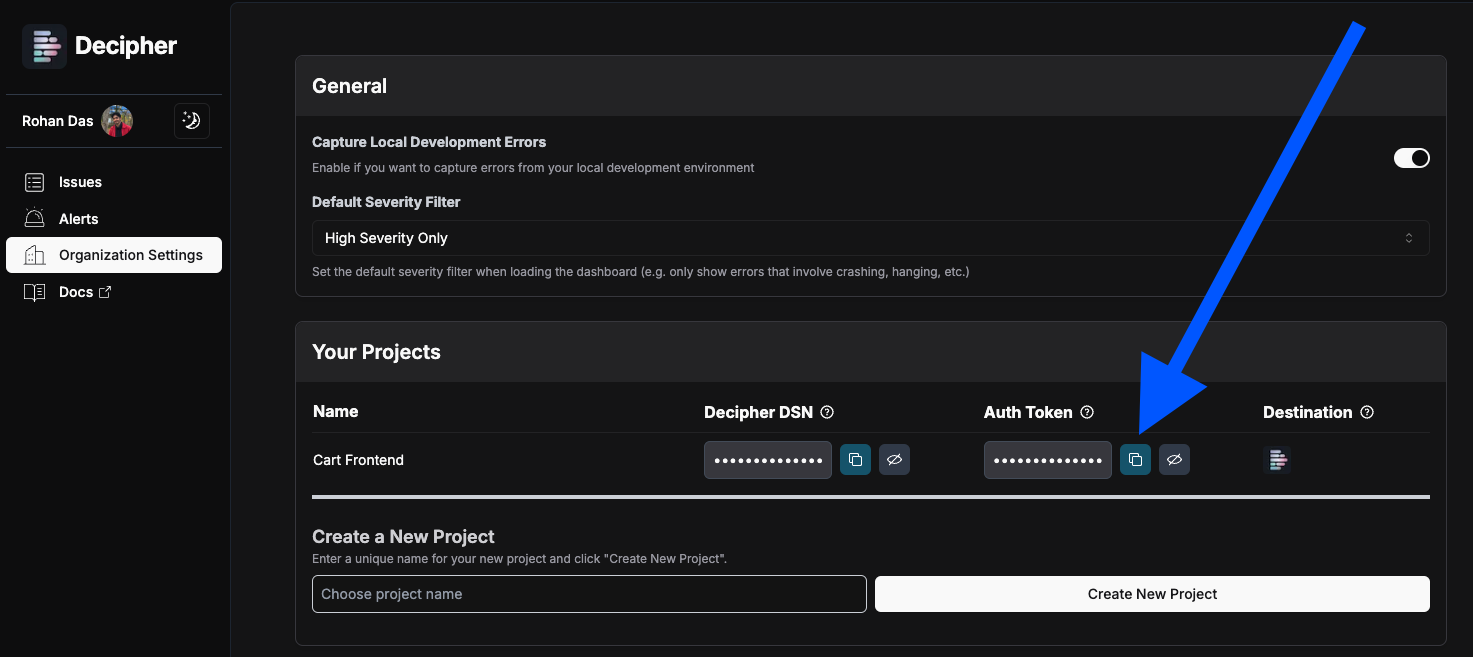
On the [Settings > Projects](https://app.getdecipher.com/settings?section=projects) page, find your project. Copy your Auth Token to use in
the next step.
 Set the environment variables `SENTRY_AUTH_TOKEN` and `SENTRY_URL` as below.
If you are already using a file like `.env.sentry-build-plugin`, update these values there, otherwise set them however you currently configure your CI/CD pipeline.
The `SENTRY_AUTH_TOKEN` is the token you copied from above.
Example:
```bash .env.sentry-build-plugin theme={null}
SENTRY_AUTH_TOKEN=sntrys_ey...
SENTRY_URL=https://proxy.getdecipher.com
```
{ /* If you have a `.sentryclirc` file, it should look like this:
```ini .sentryclirc
[auth]
token=
[global]
SENTRY_URL=https://proxy.getdecipher.com
``` */}
If your project is deployed on Vercel, you may set these environment variables within the "Settings" page of your Vercel project.
Follow the [Sentry Sourcemap uploading docs](https://docs.sentry.io/platforms/javascript/sourcemaps/uploading/) to configure Sourcemap upload for your project.
If you don't have a Sentry account, we recommend following the manual steps ([example](https://docs.sentry.io/platforms/javascript/sourcemaps/uploading/webpack/#manual-setup)).
Use the following options in your configuration:
| Config field | Value |
| - | - |
| `org` | `"decipher"` |
| `project` | `"your project name"` |
| `authToken` | `process.env.SENTRY_AUTH_TOKEN` (from the previous step) |
Examples of this are below.
```typescript next.config.[m]js theme={null}
import { withSentryConfig } from '@sentry/nextjs';
/** @type {import('next').NextConfig} */
const nextConfig = {
//... your NextConfig
}
export default withSentryConfig(nextConfig, {
org: "decipher",
project: "my-project-name",
// ...
});
```
```typescript vite.config.ts theme={null}
// ...
export default defineConfig({
build: {
sourcemap: true, // Source map generation must be turned on
},
plugins: [
vue(),
sentryVitePlugin({
org: "decipher",
project: "my-project-name",
}),
],
// ...
})
```
If you've followed the steps above fully, whenever your application is built (on production or locally, e.g. via `npm run build`), Sourcemaps will automatically be sent to Decipher and production stack traces will have readable code.
This documentation is built and hosted on [Mintlify](https://mintlify.com), a developer documentation platform.
Set the environment variables `SENTRY_AUTH_TOKEN` and `SENTRY_URL` as below.
If you are already using a file like `.env.sentry-build-plugin`, update these values there, otherwise set them however you currently configure your CI/CD pipeline.
The `SENTRY_AUTH_TOKEN` is the token you copied from above.
Example:
```bash .env.sentry-build-plugin theme={null}
SENTRY_AUTH_TOKEN=sntrys_ey...
SENTRY_URL=https://proxy.getdecipher.com
```
{ /* If you have a `.sentryclirc` file, it should look like this:
```ini .sentryclirc
[auth]
token=
[global]
SENTRY_URL=https://proxy.getdecipher.com
``` */}
If your project is deployed on Vercel, you may set these environment variables within the "Settings" page of your Vercel project.
Follow the [Sentry Sourcemap uploading docs](https://docs.sentry.io/platforms/javascript/sourcemaps/uploading/) to configure Sourcemap upload for your project.
If you don't have a Sentry account, we recommend following the manual steps ([example](https://docs.sentry.io/platforms/javascript/sourcemaps/uploading/webpack/#manual-setup)).
Use the following options in your configuration:
| Config field | Value |
| - | - |
| `org` | `"decipher"` |
| `project` | `"your project name"` |
| `authToken` | `process.env.SENTRY_AUTH_TOKEN` (from the previous step) |
Examples of this are below.
```typescript next.config.[m]js theme={null}
import { withSentryConfig } from '@sentry/nextjs';
/** @type {import('next').NextConfig} */
const nextConfig = {
//... your NextConfig
}
export default withSentryConfig(nextConfig, {
org: "decipher",
project: "my-project-name",
// ...
});
```
```typescript vite.config.ts theme={null}
// ...
export default defineConfig({
build: {
sourcemap: true, // Source map generation must be turned on
},
plugins: [
vue(),
sentryVitePlugin({
org: "decipher",
project: "my-project-name",
}),
],
// ...
})
```
If you've followed the steps above fully, whenever your application is built (on production or locally, e.g. via `npm run build`), Sourcemaps will automatically be sent to Decipher and production stack traces will have readable code.
This documentation is built and hosted on [Mintlify](https://mintlify.com), a developer documentation platform.